Reactive Programming
Developers handbook to Reactive Programming
Introduction
FRP
Elm
Reactive Extensions
Reactive Streams
Cycle.js
Data binding
Shared ideas
Reactive Extensions
Reactive Extensions (Rx) was created at Microsoft to provide a reactive extension library to normal programming languages. The first available implementation was Rx.NET for C#. Later a family of libraries for many languages (ao Java, Scala, JavaScript, Swift, Kotlin, full list) were created under the name ReactiveX, now mostly coordinated by Netflix.
Rx is build to fill the gap in the following table:
| single item | multiple items | |
| synchronous | T getData() |
Iterable<T> getData() |
| asynchronous | Future<T> getData() |
? |
It deals with multiple items in an asynchronous fashion, using the Observable-type, filling the gap in the table with Observable<T> getData(). If you have ever worked with Futures/Promises or with modern collections (with map, filter, etc.) you will see some common concepts in Observables. Basically Rx is two things:
- the Observable/Observer interfaces, the dual of Iterable/Iterator
- a very powerful API built on top
In the remainder of this article we will first explain how that duality works, and then provide some examples to get you up to speed.
Duality
In mathematics the concept of duality is a very powerful tool, often used to solve a problem in a different way. This example of using duality is one that you probably know of:
!(a && b) == !a || !b
!(a || b) == !a && !b
Developers use these rules often to simplify if-statements, and it makes sense intuitively. But to prove that this holds De Morgan used the duality between conjunction (&&) and disjunction (||) to prove that the negation (!) distributes over conjunction and disjunction. Many other dualities are used in programming, and you might have been using them without knowing.
So how does this relate to Reactive Programming? Lets take a look at the Iterable and Iterator pair of interfaces:
trait Iteratable[T] {
  def iterator(): Iterator[T]
}
trait Iteratable[T] {
  def hasNext(): boolean
  def next(): T // can throw an Exception
}
The Iterable interface is some sort of factory for creating Iterators, which we can ask whether a next value exists with hasNext and if it is available retrieve it using next. Lets take a look at how the following moveNext method does the same as above hasNext and next combined. The Option encodes what hasNext did before and the throwing of next is also made explicit.
trait Iteratable[T] {
  def moveNext(): Either[Exception,Option[T]]
}
Now moveNext is simply a getter of some type Either[Exception,Option[T]], which we will alias as A, and Iterable gets that getter. So we can abbreviate this to this Haskell-like type:
() -> (() -> A)
Dualizing is just another word for reversing the arrows. The result is that our getters become setters.
() <- (() <- A)
// tidying up by reading from right to left
((A -> ()) -> ()
Here you pass a method that wants to receive an A to a method that will then somewhere in the future callback your method when a new A is available. If we convert this back to some language like Scala we get our Observable and Observer types. The callback is implemented by the Observer, which we give to the subscribe method of the Observable.
trait Observable[T] {
  def subscribe(observer: Observer[T]): Unit
}
trait Observer[T] {
  def next(a: Either[Exception,Option[T]]): Unit
}
The next method is not really practical, so lets split that out.
trait Observable[T] {
  def subscribe(observer: Observer[T]): Unit
}
trait Observer[T] {
  def next(t: T): Unit
  def error(error: Exception): Unit
  def complete(): Unit
}
And voilà, this are the Rx types (leaving subscriptions out for simplicities sake).
Practical Rx API
By simply reversing the arrows we now have some interface that can handle asynchronous collections, but how do we use it? On top of the derived interfaces an API is available with many convenience functions. Below some methods are overloaded variants of above derived methods.
Obtaining Observables
First of all you need to be able to get some data. There are many different ways of obtaining an Observable but the most simple way would be to just write what happens when you subscribe:
val helloWorldObservable =
  Observable[String](observer => {
    observer.next("Hello World")
    observer.complete()
  })

helloWorldObservable.subscribe { (v: String) => System.out.println(v) }
// prints "Hello World"
This defines an Observable that immediately emits a string and completes. You can use your imagination here and think of using asynchronous timers to wait for some amount of time, or create loops which continue to emit indefinitely. Since above example is such a common pattern the following shortcut is available.
val helloWorldObservable = Observable.just("Hello World")
Another practical way of getting an Observable is from some existing source. Consider this RxJS example, which uses Observables to wrap some JavaScript API’s:
// DOM events
Rx.Observable.fromEvent(document.querySelector("button"), "click")

// HTTP calls, by wrapping Promise
Rx.Observable.from(fetch("http://example.org/rest/movies.json"))

// WebSockets
Rx.Observable.websocket("ws://echo.websocket.org/chatserver")
Doing things with Observables
So far we have seen nothing that mere callbacks could not do. Lets look at part of the API to get a grasp of the advantages of using Rx. Suppose we are writing an user interface which lets you search for movies, how would this look?
<div>
  <input type="text" placeholder="Type movie name here" />
  <div id="results"></div>
</div>

function render(res) {
  let titles = res.results
    .map(movie => movie.title)
    .join("<br/>")
  document.querySelector("#results").innerHTML = titles
}

function search(query) {
  const key = "d272326e467344029e68e3c4ff0b4059"
  return fetch(`https://api.themoviedb.org/3/search/multi?api_key=${key}&query=${query}`)
    .then(res => res.json())
}

Rx.Observable.fromEvent(document.querySelector("input"), "keyup")
  .map(event => event.target.value)
  .filter(query => query.length > 0)
  .switchMap(search)
  .subscribe(render)
Besides some HTML and a render function there is a piece of code starting with Rx.Observable and then a chain of method calls. This is how we apply multiple transformations on the Observable in sequence: by chaining method calls. The first operator fromEvent detects keyup events on the input field. Then we map to extract the value of the field. Next we filter to only keep the queries that are non-empty. Note that this map and filter operations looks just like a normal Array.map and Array.filter, but instead it executes every time you type a new letter. Then there is a operator with the weird name switchMap. Actually the name is not so weird, but we’ll go into that later. The main thing switchMap does is making sure that for every query we run the search function and the results are combined in one stream and continue on. At last we subscribe with our render function which will display the results.
Now, to understand how this example would look without Rx, you should know what switchMap does, as it is doing something nice to prevent timing bugs. There are 3 functions that look alike, and behave somewhat differently:
mergeMap, (also aliasedflatMap) subscribes to all Observables concurrently and merges events from every Observable in the natural order they occur,concatMapsubscribes to one Observable at a time, and thus the results are always in order of the input Observables,switchMapsubscribes immediately to the last Observable it receives and stops the previous one it was subscribed to, whether it was finished or not.
To understand them were going to use Marble Diagrams. These diagrams contain marbles (just dots) which represent events, on a line which represents time.
input:  ----1--2--3-----|->

           map(x * 2)

output: ----2--4--6-----|->
Above is a marble diagram, showing the values 1, 2 and 3 in an Observable. The final | denotes the complete event which tells us nothing more will follow. Then there is an operator (map) and a new line for the output Observable. These diagrams you’ll find in the documentation too, formatted like this:
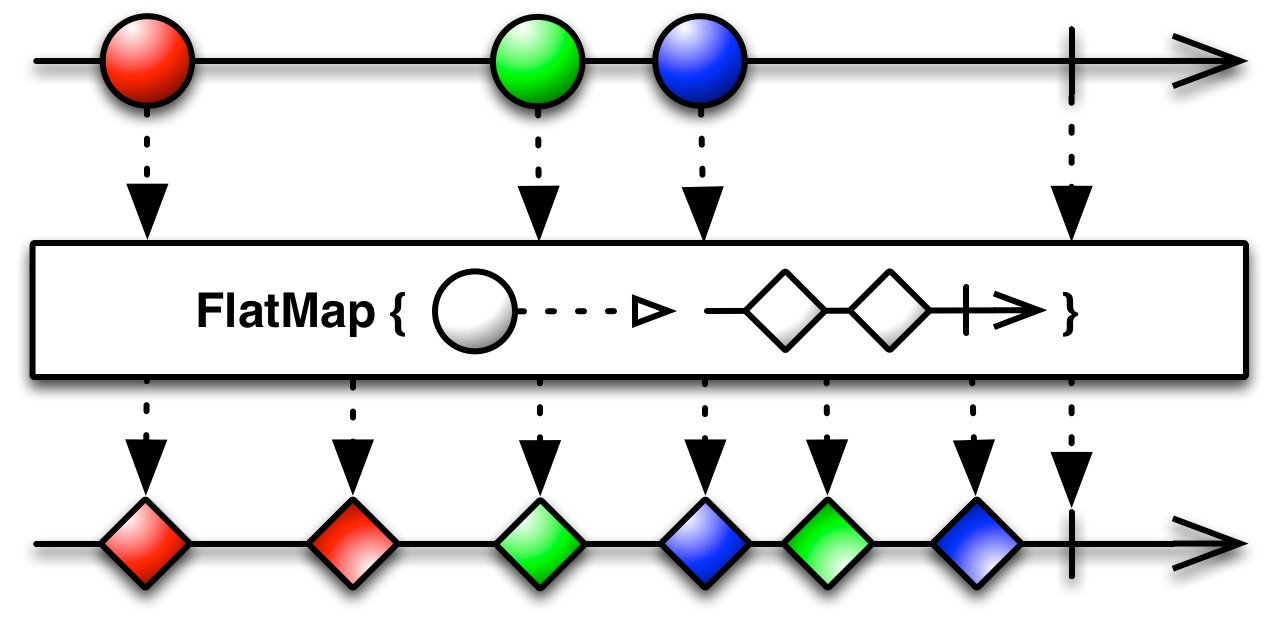
As you can see in this diagram of mergeMap/flatMap the green and blue marbles are interleaved. The first blue square event occured before the second green square. Lets compare that to concatMap.
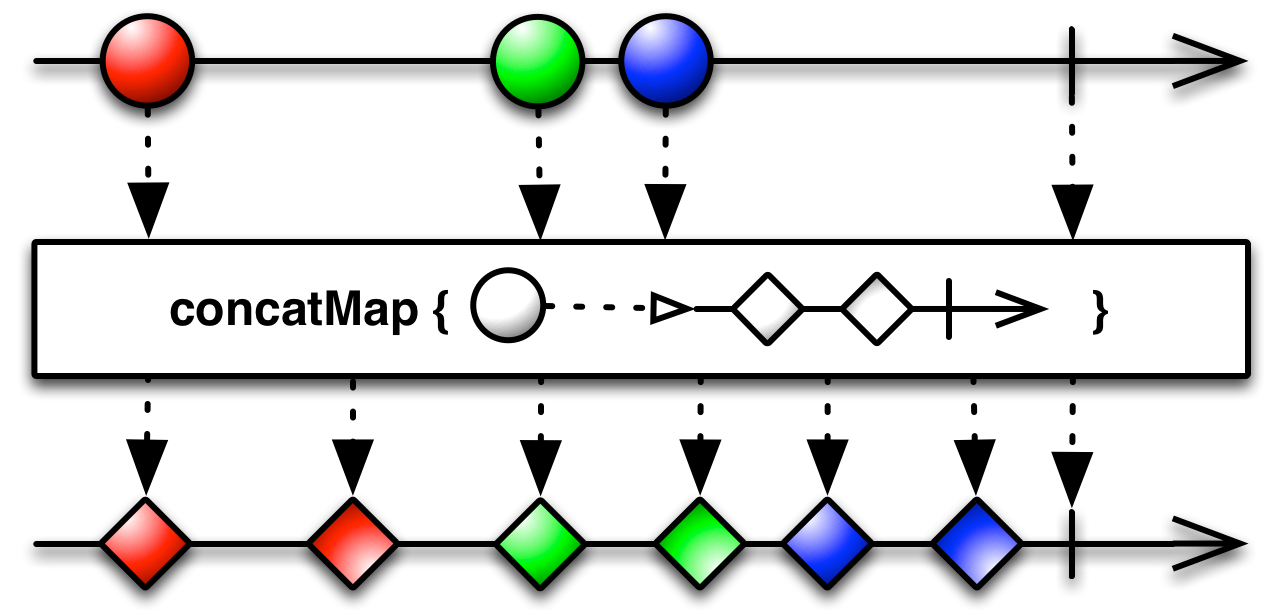
Now the blue’s only starts after the greens are complete. Finally, we look at switchMap.
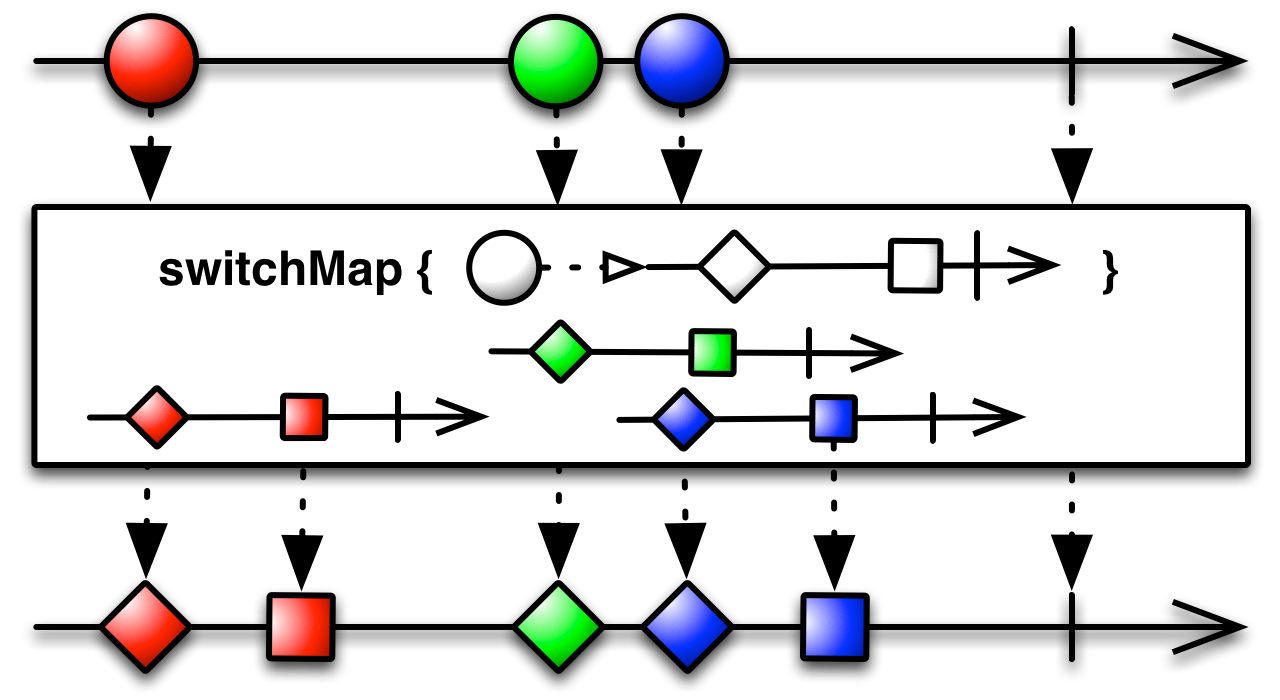
The moment that the blue circle occurs we no longer care about the green events, so we’ll cleanup or ignore those. This is just like the movie site example where we no longer care about previous suggestions if the user made an adjustment to the query. Consider what would happen if we would use mergeMap instead. Sometimes the suggestion API might be slow for one search, but fast for another. If we fire two searches, s1 and s2 and the result of s2 comes back before s1 then when the result of s1 finally arrives it will override the result of the last performed search. That would be an ugly glitch.
Consider how this example would look without Rx: first the event handler for the textfield would need to have a if-statement checking the size of the query, then it would need to forward the queries to the search function which would create the HTTP request and handle that Promise and forward to the render function. However, some bookkeeping must be done to avoid out of order responses. Some variable needs to be added keeping track of which request is the latest. We need to update that variable where the requests are made and compare the variable when the request returns. This quickly starts to look messy.
Then, when your movie site becomes featured on HackerNews, we would need to offload our back-end a bit. We could do this by only sending requests when the user stops typing, like is often seen, for example on Google’s search page. This is trivial to add in Rx, only one line needs to be added:
...
   .filter(query => query.length > 0)
+  .debounceTime(100)
   .switchMap(search)
...
But when not using Rx this adds another level of bookkeeping, which becomes hard to understand when you need to revisit the code after a few months to add another feature. Rx keeps all of this bookkeeping internal to the operators and helps you compose advanced functionality using only a few powerful operators.
Subscribing
You can not simply get() the data from an Observable, instead you define a callback that is called every time some event occurs. Above samples already contained .subscribe(render) where render is the callback function. You can call subscribe with individual functions for each type of event (remember: next, error or complete), with only a subset or with an Observer. The subscribe method makes sure that if you pass in anything other than a Observer interface, the thing is wrapped and complemented with no-op functions. Basically this all works:
observable.subscribe(next => {}, error => {}, () => {})
observable.subscribe(next => {}, error => {})
observable.subscribe(next => {})
observable.subscribe({
  next: (next) => {},
  error: (error) => {},
  complete: () => {},
})
If you for some reason want all values in the Observable, then you need to wait for all events to arrive. Luckily there is an operator for this toArray() which will send 1 single next event containing an array (and a complete) after it receives a complete.
observable.toArray().subscribe(array => {})