Reactive Programming
Developers handbook to Reactive Programming
Introduction
FRP
Elm
Reactive Extensions
Reactive Streams
Cycle.js
Data binding
Shared ideas
Elm
Elm is a language for creating web applications that are guaranteed to never crash and have great performance. Elm is a language, so you will not be writing the web’s default language JavaScript, but instead a form of Haskell, which is actually quite easy to learn. Having a dedicated language makes the guarantees of high performance and lack of crashes possible.
Elm has gone through a major change very recently. It is therefore important to distinguish between Elm < 0.17 and Elm 0.17 and above. The authors of Elm changed Elm in a fundamental way as they felt that the change would simplify learning Elm, while remaining equally powerful.
Lets delve straight into what was later removed, but made Elm Functional Reactive Programming.
Signals (Elm < 0.17)
A signal is a value that changes over time. This abstraction comes straight from FRP. A typical Elm program with signals looks like this:
main = lift asText Mouse.position
This program continuously outputs the position of the mouse whenever it changes. Compiled and run it looks like this:
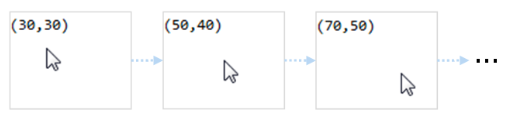
The signals in this application are Mouse.position which is a signal of tupled x and y positions, and lift asTest Mouse.position which is a new signal made of the first signal and the transformation asText. asText simply makes the tuples of coordinates into a string like "(40,100)". The function lift applies asText to every single value inside the Mouse.position signal.
| Signal | Type and description | |
|---|---|---|
Mouse.position |
Signal (Int,Int) |
Mouse coordinates |
Mouse.clicks |
Signal () |
Mouse clicks |
Window.dimensions |
Signal (Int,Int) |
Browser window size |
Time.every |
Time -> Signal Time |
signal firing every t ms |
Time.fps |
Float -> Signal Time |
signal firing at a certain fps |
Touch.touches |
Signal [Touch] |
list of touches |
Touch.taps |
Signal { x: Int, y: Int } |
latest tap position |
Keyboard.keysDown |
Signal [KeyCode] |
list of pressed keys |
Keyboard.arrows |
Signal { x: Int, y: Int } |
direction of arrow keys pressed |
Keyboard.shift |
Signal Bool |
whether shift key is pressed |
Input.text |
String -> (Singal Element, Signal String) |
create a text input field |
There are different ways to deal with multiple signals. To receive the values in two or more signals use
map2,
map3,
etcetera.
map2
    :  (a -> b -> result)
    -> Signal a
    -> Signal b
    -> Signal result
Below example uses map2 to combine two signals. The ratio takes the latest values of both signals simultaneously.
ratio : Int -> Int -> Float
ratio width height =
    toFloat width / toFloat height

aspectRatio : Signal Float
aspectRatio =
    map2 ratio Window.width Window.height
If you have two signals that you want to merge into a single signal use merge or mergeMany:
-- Update is a union type: either a mouse move, a time delta or a click
type Update = MouseMove (Int,Int) | TimeDelta Float | Click

updates : Signal Update
updates =
    mergeMany
        [ map MouseMove Mouse.position
        , map TimeDelta (fps 40)
        , map (always Click) Mouse.clicks
        ]
A common task is using the value of a signal and the previous value to compute differences or accumulates. Precisely for this there is foldp (p for past), which is like a standard Array.fold but over time. Consider for example click counting. In below sample the clickCount-signal starts at 0 and after every click 1 is added to the total.
clickCount : Signal Int
clickCount =
    foldp (\click total -> total + 1) 0 Mouse.clicks
Signals of signals
One thing that Elm does explicitly forbid is Signals of Signals. Having Signals inside Signals might be hard to grasp, but an example where other RP libraries use this is for example HTTP requests after some events happens. A simple explainer for this restriction - courtesy of the creator of Elm - goes like this:
If our program has executed for, say 10 minutes, we might create a signal that (through the use of
foldp) depends on the history of an input signal, sayWindow.width. To compute the current value of this signal, should we use the entire history ofWindow.width? But that would require saving all history ofWindow.widthfrom the beginning of execution, even though we do not know whether the history will be needed later. Alternatively, we could compute the current value of the signal just using the current and new values ofWindow.width(i.e., ignoring the history). But this would allow the possibility of having two identically defined signals that have different values, based on when they were created. We avoid these issues by ruling out signals of signals.
So there are two ways to implement dynamic signals:
- storing the full history of signals
- ignore the history and only incorporate new values
The first choice is not an option for performance reasons. Now for the second option:
clicks = foldp (\click total -> total + 1) 0 Mouse.clicks

-- after 10 minutes `otherClicks` is defined in your program
otherClicks = foldp (\click total -> total + 1) 0 Mouse.clicks
The second is not an option since they want the following to be true for Elm: clicks and otherClicks contain the same signal value (foldp (\click total -> total + 1) 0 Mouse.clicks) thus clicks must be exactly the same signal in every case, with equal values, but if otherClicks missed the 3 mouse clicks in the first 10 minutes the signal will contain a count of 3 less than clicks.
So why does the original FRP support higher-order signals while Elm can’t? In FRP constructors of signals take the start time as a parameter. Therefore Mouse.clicks t1 can be different than Mouse.clicks t2 as long as t1 != t2. This allows FRP to dynamically create new signals that do not require keeping history while still being pure. The more complicated constructors and the complexity of higher-order streams do not match Elms strive for simplicity however.
Alternatives to higher order streams
The lack of higher-order signals “does not overly limit the expressiveness” according to the authors of Elm. So how is this possible? Elm has another feature that must help:
Automaton.
Elm contains an implementation of discrete Arrowized FRP (AFRP) to structure stateful programs in the form of Automaton. The signal functions of AFRP encapsulate the state and can be safely switched in and out of a program. Basically Automata for submodules of your logic and they can be combined or switched to create larger modules. With higher order signals the inner signals would receive their own specific treatment before they are merged to some output. With Automata all potentially inner signals are just one large signal and the active automata decides which values to forward to which internal Automaton, which to process and which to ignore.
To give an example, lets write some higher order stream with Rx and then solve the same problem with an Automaton:
let down = Rx.Observable.fromEvent("mousedown")
let move = Rx.Observable.fromEvent("mousemove")
let up = Rx.Observable.fromEvent("mouseup")

function accumulate(state, evt) {
  let x = state.clientX - event.clientX
  let y = state.clientY - event.clientY
  let d = state.d + Math.sqrt(x*x + y*y)
  return {
    x: evt.clientX,
    y: evt.clientY,
    d: d
  }
}

function perDrag(startEvt) {
  return move.scan(accumulate, {
      x: startEvt.clientX,
      y: startEvt.clientY,
      d: 0
    })
    .map(_ => _.d)
    .takeUntil(up)
}

down.flatMap(perDrag).subscribe(d =>
  console.log("distanceDragged", d)
)
Using Elm Automaton:
import Mouse exposing (..)
import Automaton exposing (..)
import Signal exposing (map2, map, foldp)
import Graphics.Element exposing (show, Element)

type alias Pair = (Int,Int)
type alias Dist = Int

combinedInputs = map2 (,) Mouse.isDown Mouse.position

dist : Pair -> Pair -> Dist
dist (x1,y1) (x2,y2) =
  let
    dx = toFloat x1 - toFloat x2
    dy = toFloat y1 - toFloat y2
  in
    round (sqrt (dx * dx + dy * dy))

-- skip first step if supplied -1 for d
measureStep : Pair -> (Dist, Pair) -> (Dist, (Dist, Pair))
measureStep next (d, previous) =
  let
    sum = (if d < 0 then 0 else d + dist previous next)
  in
    (sum, (sum, next))

measure : Pair -> Automaton Pair Dist
measure initialPos = hiddenState (-1, initialPos) measureStep

ignore : Automaton Pair Dist
ignore = pure (\_ -> 0)

hoMeasure : Automaton (Bool, Pair) Dist
hoMeasure =
  let
    f : (Bool, Pair)
      -> (Bool, Automaton Pair Dist)
      -> (Dist, (Bool, Automaton Pair Dist))
    f (down, pos) (pDown, a) =
      if down == pDown then
        (snd (step pos a), (down, fst (step pos a)))
      else if down then
        (0, (down, measure pos))
      else
        (0, (down, ignore))
  in
    hiddenState (False, ignore) f

main = map (\output -> show output) (run hoMeasure 0 combinedInputs)
How do these samples compare? While the Rx manages state by creating a stream per drag, the Elm example has a non-higher-order signal combinedInputs adding a little more bookkeeping later on. The Elm sample contains 2 Automata (measure initialPos and hoMeasure). The hoMeasure Automaton is a higher order wrapper around measure that resets the total distance upon drag end. The resulting Elm code does not look nice: the hoMeasure function requires manual switching. Support for switching Automata was discussed but never implemented.
Elm 0.17, alternative to signals
Over several versions the Elm Architecture emerged: if you model your application as a Model View Update-loop you do not need to use signals as much. This pattern became the basis for the start-app package which provided a way to write Elm programs without learning about signals right away. The experiment showed that Elm became significantly easier to learn and this formed the road to Elm 0.17.
With Elm 0.17 the authors bid a farewell to FRP, they no longer advertise to be a Functional Reactive Programming language. The concept of Signal streams is fully replaced in 0.17 by Subscription’s.
All of the reactivity is centralized in Subscriptions: those define external inputs that come into the application and setup in which format the data gets processed inside the regular update-function. Take for example this websocket sample:
main =
  Html.program
    { init = init
    , view = view
    , update = update
    , subscriptions = subscriptions
    }

-- ... more code ...

-- UPDATE

type Msg
  = Input String
  | Send
  | NewMessage String

update : Msg -> Model -> (Model, Cmd Msg)
update msg {input, messages} =
  case msg of
    Input newInput ->
      (Model newInput messages, Cmd.none)

    Send ->
      (Model "" messages, WebSocket.send "ws://echo.websocket.org" input)

    NewMessage str ->
      (Model input (str :: messages), Cmd.none)

-- SUBSCRIPTIONS

subscriptions : Model -> Sub Msg
subscriptions model =
  WebSocket.listen "ws://echo.websocket.org" NewMessage
In this example WebSocket.list "ws://echo.websocket.org" NewMessage defines the reactive input: every new message gets packaged in the NewMessage type and is delivered by Elm to the update function. Elm’s Html.program attaches the subscriptions to the update function, the model (first output of update) to re-rendering using the view method, the commands (second output of update) to the Elm runtime executing the effect.
Lets look at the example of measuring dragged distance from above, using this new architecture:
import Html exposing (Html, text, div)
import Mouse exposing (..)

dist : (Int, Int) -> (Int, Int) -> Int
dist (x1,y1) (x2,y2) =
  let
    dx = toFloat x1 - toFloat x2
    dy = toFloat y1 - toFloat y2
  in
    round (sqrt (dx * dx + dy * dy))

main =
  Html.program
    { init = init
    , view = view
    , update = update
    , subscriptions = subscriptions
    }

-- MODEL

type alias Model = {
  x: Int
  , y : Int
  , d : Int
  , track : Bool
}

initialModel: Model
initialModel =
  { x = 0
  , y = 0
  , d = 0
  , track = False
  }

init : (Model, Cmd Msg)
init =
  (initialModel, Cmd.none)

-- UPDATE

type Msg
  = Position Int Int
  | Up Int Int
  | Down  Int Int

update: Msg -> Model -> (Model, Cmd a)
update msg model =
  case msg of
    Position x y ->
      let
        d = if model.track then model.d + dist (model.x, model.y) (x, y) else model.d
      in
        ({model | x = x, y = y, d = d} , Cmd.none)
    Up x y ->
      ({model | x = x, y = y, track = False} , Cmd.none)
    Down x y ->
      ({model | x = x, y = y, track = True, d = 0} , Cmd.none)

-- SUBSCRIPTIONS

subscriptions: Model -> Sub Msg
subscriptions model =
  Sub.batch
  [ Mouse.moves (\{x, y} -> Position x y)
  , Mouse.ups (\{x, y} -> Up x y)
  , Mouse.downs (\{x, y} -> Down x y)
  ]

-- VIEW

view: Model -> Html a
view model =
  Html.text (toString model.d)
After the subscriptions enter the update function as Msg’s they are handled just like internal events. The advantages are that we (1) can look to the subscriptions declaration and quickly see the external inputs, (2) have all updates to the model in 1 place, without complicated signal functions.
Developers can now use Elm and think in terms of synchronous and pure code: the concurrency, subscriptions and effects are handled by Elm.
A great guide explaining the differences between version 0.16 and 0.17 is available here: Migrating away from Signals (0.16 to 0.17).
Conclusion
Elm started of as a Functional Reactive Programming language, with no support for higher order Signals. Over time a different pattern emerged and was called the Elm Architecture, which is a Model View Update (MVU) architecture. This pattern allowed Elm applications to be written without much use of signals. In Elm 0.17 Signals where replaced with Subscriptions, which are managed by the Elm runtime and directly send their data to the Update part of the architecture. Without powerful reactive primitives (Subscriptions Sub only have a map method) Elm now is more or less comparable to Data Binding frameworks like the combination of Redux + React.